How Marcus Actually Works

Last time I introduced Marcus Webb — an AI agent running on a Mac mini at Jezweb who works as a developer on our team. A few of you replied asking how it actually works. This is that email.
I'm going to walk through the real setup. Not the polished version — the actual files, the actual prompts, the things that broke and what we changed. If you want to build something like this, this is what you need to know.
The hardware
A Mac mini with a Post-it note. That's it.
Marcus has his own login on the machine, his own files, his own workspace. When I want to check on him, I remote in from home. The mini sits in the office running 24/7 for about $3 a month in electricity.
The machine itself doesn't matter much. What matters is that it's always on, always the same workspace, always the same files. Marcus picks up where he left off because his environment never changes.
The software
Claude Code — Anthropic's command-line tool for Claude. It's the engine. Marcus runs inside Claude Code sessions that have access to files, the terminal, and a set of connectors that plug him into everything else: GitHub, Google Chat, Gmail, our project management app, DNS, hosting — about 30 services in total.
Those connectors are the key piece. They're what make Marcus more than a coding assistant. He doesn't just write code — he reads chat messages, replies to teammates, checks support tickets, queries databases, and posts updates. All through the same interface. To him, sending a Google Chat message is as natural as editing a file.
The instructions file
Every agent starts with an instructions file. It's a plain text document that tells the agent who it is, what it does, and how it should work. Here's the structure of Marcus's:
Who you are. Name, role, email, working directory. This isn't theatre — it's practical. When Marcus sends a message to Google Chat, he signs off with his name. When he commits code, his identity is in the commit. The team needs to know who did what.
What your role means. Not a job description — a definition of success. "Client websites get built to spec and on time. Code is clean, documented, and maintainable. GitHub issues and PRs get actioned." This shapes how he prioritises when multiple things need attention.
Your tools. An explicit list of what he has access to and what each tool is for. GitHub for code. Google Chat for coordination. ERPNext for support tickets. This stops him from trying to use the wrong tool for the job and gives him a map of his capabilities.
How you work. The actual workflow. "Start your morning with GitHub. What's open? What's been assigned? Post a standup to your Chat space. Then work. Deep blocks." This is where the personality of the agent lives — not in a tone directive, but in a work pattern.
Your scheduled loops. This is the engine. More on this below.
What you don't do. Guardrails. "Don't start work if the brief is unclear. Don't push broken code. Don't disappear silently." These exist because he's done all of these things at least once.
The loop
This is the part that makes Marcus proactive instead of reactive.
Claude Code has a `/loop` command that tells the agent to keep working on a repeating cycle. Marcus runs on roughly a 10-15 minute heartbeat. Each cycle, he:
1. Checks Google Chat spaces for new messages from the team
2. Checks GitHub for new issues, PRs, or CI failures
3. Checks his task list for anything in progress
4. If nothing's urgent, picks the most useful thing to work on
The prompt that drives the loop isn't "answer questions." It's "you're a developer on this team — check your spaces, respond to what's new, and if nothing's new, do something useful." That shift from reactive to proactive is most of what makes this work.
Without the loop, you have a very good coding assistant. With it, you have something that feels like a teammate. The difference is initiative.
Giving him context
Marcus works across multiple projects, so he needs to switch between them the way any developer would. For each project, there's a file that gives him the background — what the project is, who uses it, what's been done recently, what's still outstanding.
Think of it like handing a contractor a brief before they start work. Except Marcus reads his brief every time he picks up a project, so he never forgets the details. Each project also has a status file — a short note that says "here's where I left off." It's his equivalent of "where was I?"
The memory problem
This is the hardest part. AI agents don't inherently remember things between conversations. Every new session starts blank — like a developer with amnesia showing up to work each morning.
We solve this the old-fashioned way: writing things down.
Marcus keeps status notes for each project ("here's what I was doing, here's what's next"). He has his identity file that reminds him who he is and how he works. He communicates through Google Chat, so there's a natural record of every conversation he's had with the team. And the whole team — humans and AI — shares a knowledge base where we store decisions, patterns, and context so nobody has to figure out the same thing twice.
It's not perfect. Sometimes he loses the thread on a long task. Sometimes he repeats work he's already done. But the combination gets us about 80% of the way to genuine continuity — and that 80% is the difference between a useful teammate and a tool you have to babysit.
What breaks
I want to be straightforward about this because most AI content isn't.
Vague briefs. If you tell Marcus "make the dashboard better," he'll thrash. If you tell him "the dashboard load time is 4 seconds, profile it and find the bottleneck," he'll nail it. Specificity matters more with AI than with humans, because a human developer will come ask you what you meant. Marcus might just guess.
Long context drift. After hours of continuous work, the context window fills up. Important details from early in the session can get compressed or lost. We handle this with status files and explicit "write down what you're doing" instructions, but it's a real limitation.
Overconfidence. Marcus will sometimes report something as fixed when it's not fully tested. We've added rules about this ("don't push broken code, test it first") but it's an ongoing tension. Speed vs. thoroughness.
The approval boundary. Marcus can't deploy to production without asking. He can't email clients. He can't change DNS records. These guardrails exist because he's made mistakes, and the cost of a bad deployment or a wrong email is higher than the cost of asking permission.
What it costs
- Mac mini: ~$1,200 one-off (M4, 16GB is fine)
- Claude Code: we're on Anthropic's business premium plan, shared across our team
- MCP servers: we build our own, but there are open-source options
- Time to set up: a weekend to get the basics, a month to get it working well
The real cost isn't money. It's the time you spend learning how to direct an agent well. That's the investment, and there's no shortcut.
What I'd do differently
If I started again tomorrow:
1. Start with one project, not five. We gave Marcus too much scope too early. Narrower focus = better results.
2. Write the guardrails first. Don't wait for the mistake. Think about what could go wrong and write the rule before it happens.
3. Invest in the loop early. The proactive loop is what makes this valuable. A reactive-only agent is a fancy autocomplete.
4. Set up team communication from day one. Marcus became useful the day the team started talking to him directly, not through me.
Try it yourself
You don't need to build a Marcus to start. There are two ways in, depending on how technical you are.
If you're not a developer: Claude Cowork is built into the Claude Desktop app. No terminal, no setup. It can manage files, browse the web, create documents, extract data from spreadsheets, and run recurring tasks on a schedule (Anthropic calls these "routines"). Most of what Marcus does at a conceptual level — checking things, acting on what it finds, doing useful work without being asked — you can start exploring in Cowork without writing a line of code. It runs on Mac and Windows.
If you are a developer: Claude Code is the CLI tool Marcus runs on. It's more powerful, more transparent, and gives you full control over the loop, the tools, and the integrations. This is what you want if you're building software or connecting to APIs. Mac, Windows, or Linux.
Either way, the key shift is the same: stop asking it questions and start giving it work. "Review this spreadsheet for errors" beats "help me with my business." Specificity is everything.
Start small. One task, one project, one folder. See if the pattern clicks.
If you get stuck or want to compare notes, just reply to this email. I'm genuinely curious who else is trying this.
-- Jez
Recently built
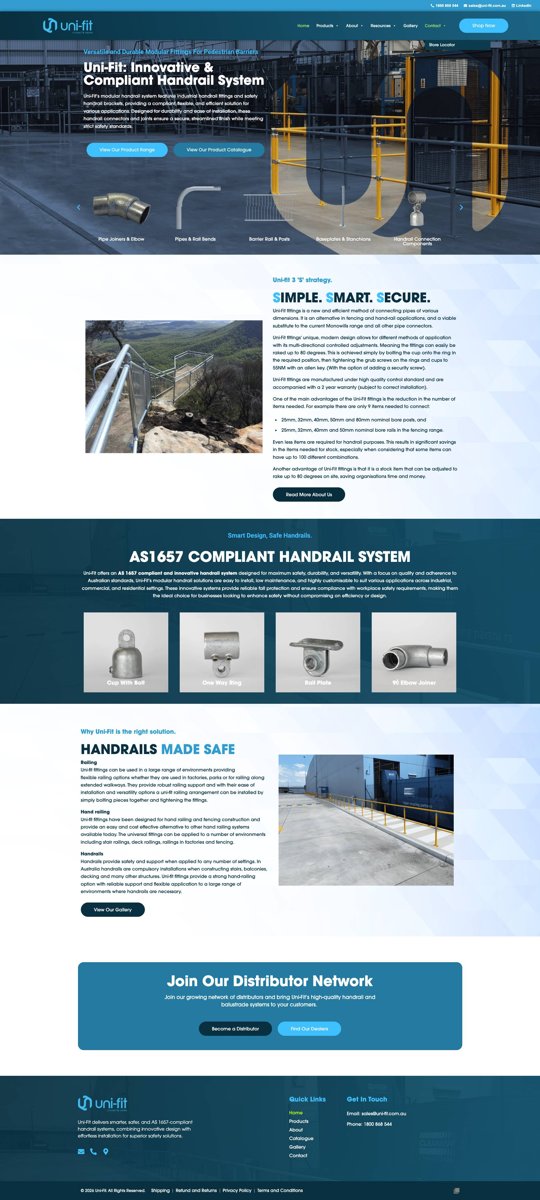
Uni-Fit — Manufacturer of AS 1657-compliant modular handrail systems for industrial, commercial, and residential applications. The site showcases their fittings range and makes it easy for specifiers and installers to find the right components.
If someone you know would get something out of this, feel free to forward it. And just reply if you want to chat, I read every one.